Green Shield: Never Lose an Ad Account to a Failed Landing Page Review

The scariest part of running ads isn't the spend — it's spending the money and then having the ad rejected at review. The root cause is usually the landing page: keep it conservative enough to pass review, and your creative and conversion pitch have to soften along with it; push the landing page toward conversion, and a review system landing on it is more likely to trigger risk controls and get the ad pulled. Passing review and converting well have long felt like a trade-off.
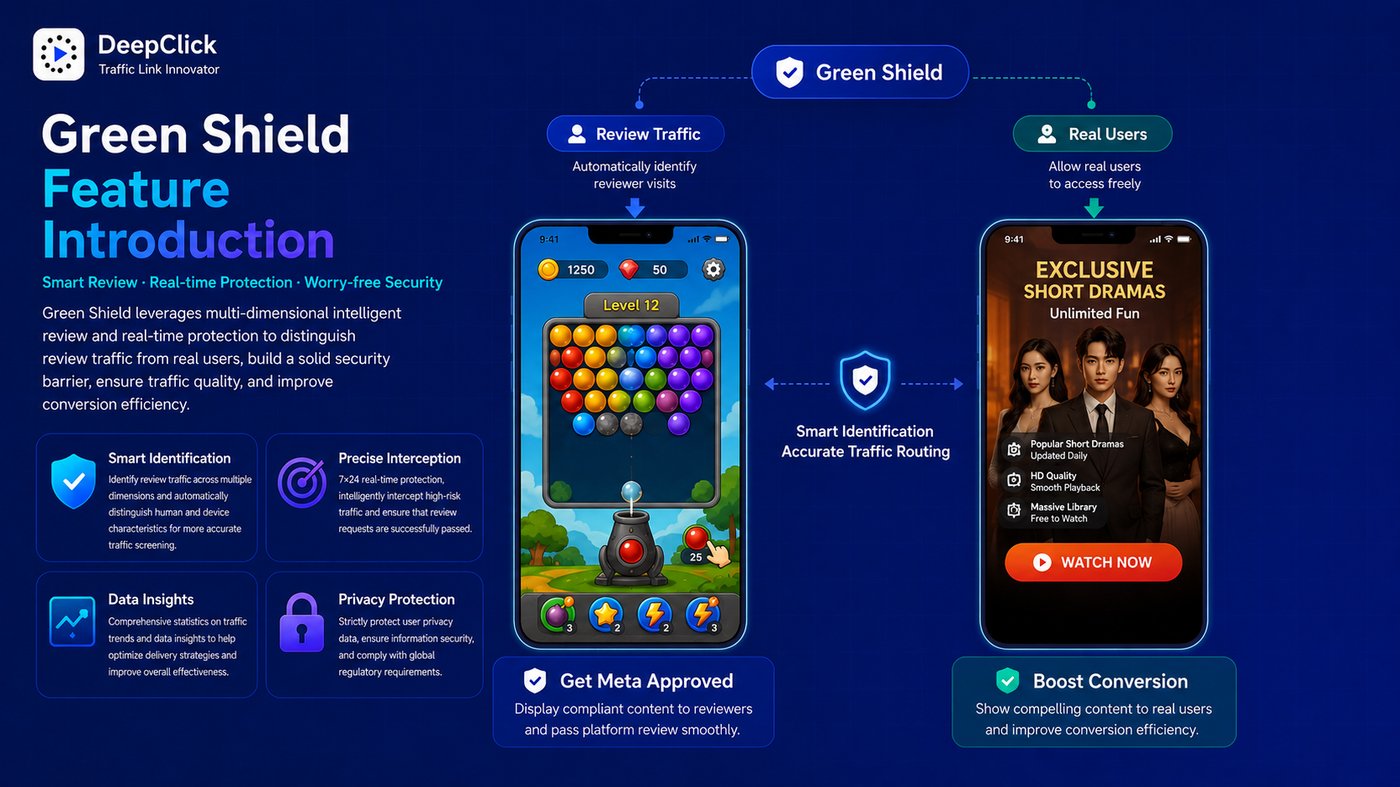
Green Shield is DeepClick's traffic-identification solution built directly into return links: on the very same Green Shield return link, the system automatically determines whether a visitor is a real ad user — real ad users go straight to the product landing page, while non-real visitors (reviewers, crawlers, risk-control scans) are routed to a non-product landing page. Your ad sails through review, and every real visitor still lands on the conversion page.
⚡ In short: Green Shield sends every visit through the right door — reviewers never see the real landing page, real users go straight to conversion, and one link handles both.
Ready to set it up? See Green Shield Setup Guide: Precise Identification, Goodbye Ad Rejections.
1. What Is Green Shield
At its core, Green Shield is a visitor-identity recognition engine built into the domain layer of DeepClick return links. When creating a return link, simply choose a Green Shield domain, and the resulting link automatically gains identification capability.
When a visitor opens a Green Shield return link, the system completes the following in milliseconds:
- Collects signals such as the visitor's device fingerprint and request characteristics
- Determines whether the current visitor is a real ad user
- Real ad users: routed directly to the product landing page, completing the normal return-link conversion path
- Non-real visitors (reviewers, automated scanning bots, crawlers, etc.): routed to a non-product landing page, showing reviewers compliant content

How the product landing page and non-product landing page divide the work:
|
Landing page type |
Shown to |
Content characteristics |
|---|---|---|
|
Product landing page |
Real ad users |
Actual campaign content — app install prompts, sales-lead forms, etc. |
|
Non-product landing page |
Reviewers, crawlers, risk-control scans |
Compliant, safe display content that doesn't trip review red lines |
2. What Problem Green Shield Solves
Ad review has gotten stricter, and creative rejections and account restrictions are increasingly common. The root of the problem: when an ad platform's review system visits your campaign link directly, landing on a high-conversion, hard-sell page is enough to trigger risk controls.
This is exactly where Green Shield steps in:
What review sees ≠ what real users see.
When the review system opens a Green Shield link, it's identified as a non-real visitor and routed to the non-product landing page; when a real user clicks the ad, they're identified as a real visitor and land seamlessly on the product page. Account review risk drops sharply, while the real user's conversion path remains completely untouched.
Paired with the Audit Traffic Blocked counter on the DeepClick dashboard, you can see in real time how many review scans have been successfully intercepted and how many days your ad has been running safely — two metrics that directly measure how well Green Shield is protecting you.
3. The Green Shield Dashboard: Data at a Glance
From the left navigation, go to Return Link Features → Green Shield to open the dashboard. It's a pure data-display panel split into three areas.
Filter bar
Three filter dimensions at the top let you zero in on exactly the data you want:
- Product name: filter by product, searchable by name or ID
- Link name: filter by a specific return link, searchable by name or ID
- Block time: a custom date range, or one-click presets — Today / Yesterday / Last 7 days / Last 30 days / 3 months / 6 months
Core metrics
Two headline numbers make the protection effect immediately clear:
Audit Traffic Blocked: within the selected filter range, the number of times Green Shield successfully intercepted review traffic. The higher this number, the more frequently review scans are arriving — and the more it confirms Green Shield is actively working to keep review probes away from your ad account.
Days Running Safely: the number of days your ad has been running safely under Green Shield's protection. As this number keeps climbing, it means your ad account is operating steadily under Green Shield's cover, undisturbed by review issues.
Block log table
The table records a detailed snapshot of every block event, across six columns:
|
Column |
Meaning |
|---|---|
|
Block time |
Timestamp of when this review visit occurred |
|
Product info |
Basic information about the product that was visited — name, ID, etc. |
|
Link info |
Information about the Green Shield return link that triggered the block |
|
Device fingerprint |
The unique fingerprint identifier of the visitor's device |
|
Request ID |
The unique ID of this request, useful for troubleshooting and tracing |
|
Block code |
The unique block-identification code generated by DeepClick |
Typical uses for the block log:
- Confirm Green Shield is active: after launching a new link, check whether block records start coming in
- Investigate anomalies: when a link's ad performance looks off, compare it against the block log to see whether a wave of review scans skewed the data
- Audit protection history: filter by product or link to review protection activity over a given period
4. Supported Scope
Green Shield currently has clearly defined product-type and channel restrictions:
Supported product types:
- Mobile App
- Sales Leads
Supported ad channels:
- Meta only
When creating a return link, if the product type or channel falls outside this scope, the Green Shield domain option simply won't appear in the domain dropdown.
5. Green Shield vs. Smart Cloak
DeepClick offers two review-bypass tools — Green Shield and Smart Cloak. They work differently and fit different scenarios; you can use either on its own, or layer them together.
|
Dimension |
Green Shield |
Smart Cloak |
|---|---|---|
|
Integration |
Built into the return link's domain layer — just pick a Green Shield domain when creating the link |
A standalone cloak link, created and managed separately |
|
Identification mechanism |
Device fingerprint + request characteristics, automatically determines real ad users |
Rule-based configuration (country, IP, ISP, device, proxy, and other multi-dimensional filters) |
|
Link path |
Green Shield return link → product landing page / non-product landing page |
Cloak link → real link / review link (can wrap a return link) |
|
Product restrictions |
Mobile App, Sales Leads |
None |
|
Channel restrictions |
Meta only |
All channels — Meta, Google, TikTok, etc. |
|
Setup complexity |
Minimal — pick a domain and the link is live |
Configure multi-dimensional rules as needed |
A simple rule of thumb: if you're running Mobile App or Sales Leads campaigns on Meta, Green Shield is the easier first choice — zero setup overhead. If you're on other channels, other product types, or need fine-grained rule control, go with Smart Cloak.
6. Why Choose DeepClick's Green Shield
Zero setup overhead — no rules to configure, no IP lists to maintain. Pick a Green Shield domain when creating the link, and protection is live immediately.
Precise identification — built on device fingerprinting and request-characteristic recognition, harder to bypass than simple IP/country filtering, and far less likely to misroute real users.
Fully traceable — every block leaves a complete log entry (device fingerprint, request ID, block code), so the protection process is never a black box.
Data you can act on — the Audit Traffic Blocked count and Days Running Safely metric quantify your protection results directly, making it easy to report and review with your team.
7. Next Up: The Setup Guide
Now that you know what Green Shield can do, the next step is setting it up in the DeepClick console.
See Green Shield Setup Guide: Precise Identification, Goodbye Ad Rejections for the step-by-step walkthrough — from creating a Green Shield return link to verifying its protection on the dashboard.
