Smart Cloak: Ad Cloaking Services for Review-Proof, Stable Growth

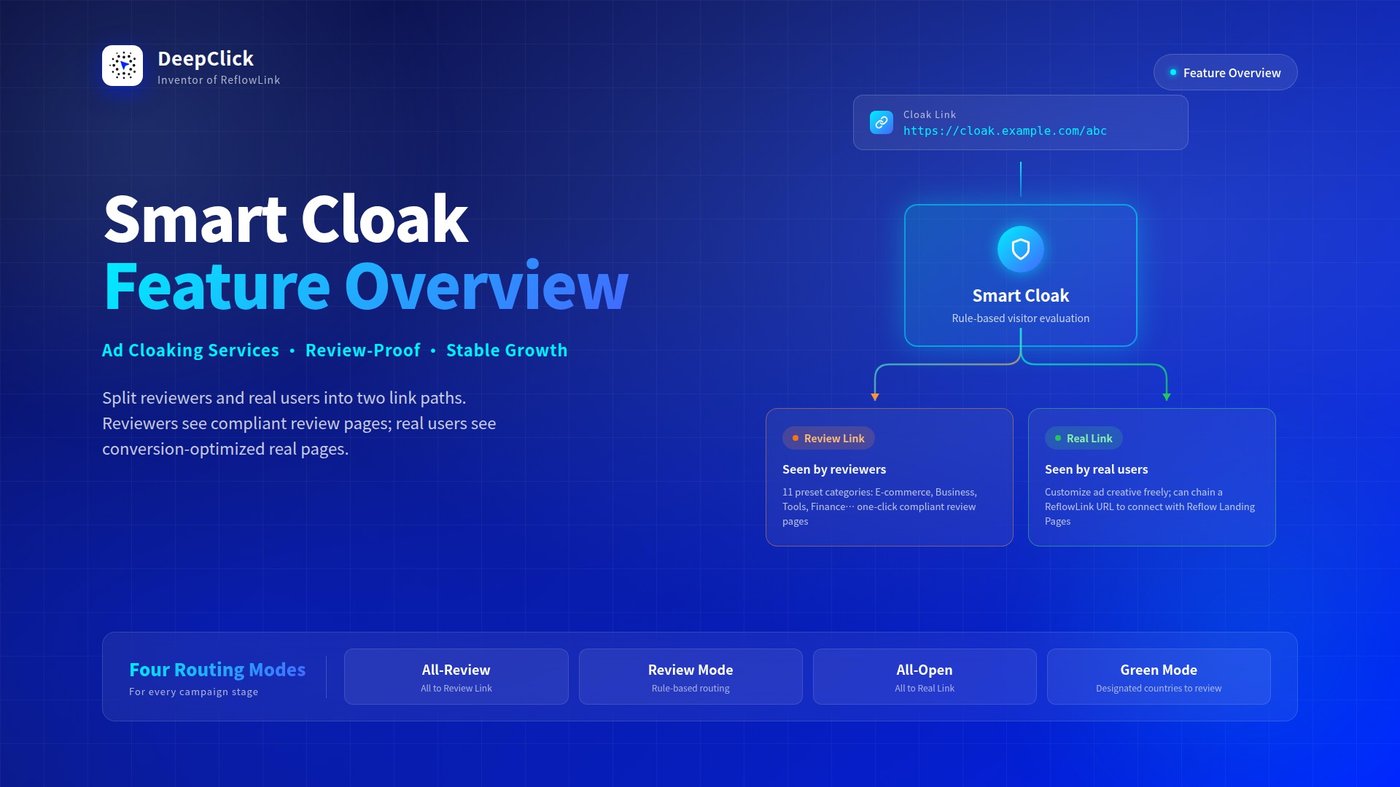
The most painful part of running ads is having a carefully crafted creative rejected during platform review—or, worse, getting taken down mid-campaign by a re-review. Smart Cloak (Ad Cloaking Services) is DeepClick Platform's traffic routing solution: it splits traffic into two paths so reviewers see a clean, compliant page while real users see your conversion-optimized real page. The two never interfere with each other.
⚡ TL;DR: Smart Cloak gives a single ad link a "two-faced" identity—reviewers go to the Review Link, real users go to the Real Link. The two paths never collide.
Want to know how to configure Smart Cloak step by step in DeepClick Platform? See Smart Cloak Setup Guide: Pass Reviews Smartly, Grow Without Worry.
1. What is Smart Cloak
Think of it as a traffic routing engine: you configure rules in the DeepClick Platform backend, and the system generates a single Cloak Link for you to use in your ad campaigns. When a user clicks the Cloak Link:
- They first land on the Cloak Domain
- The system evaluates whether the visitor is a reviewer or a real user, based on your rules
- It redirects them to the appropriate destination—either the Review Link or the Real Link
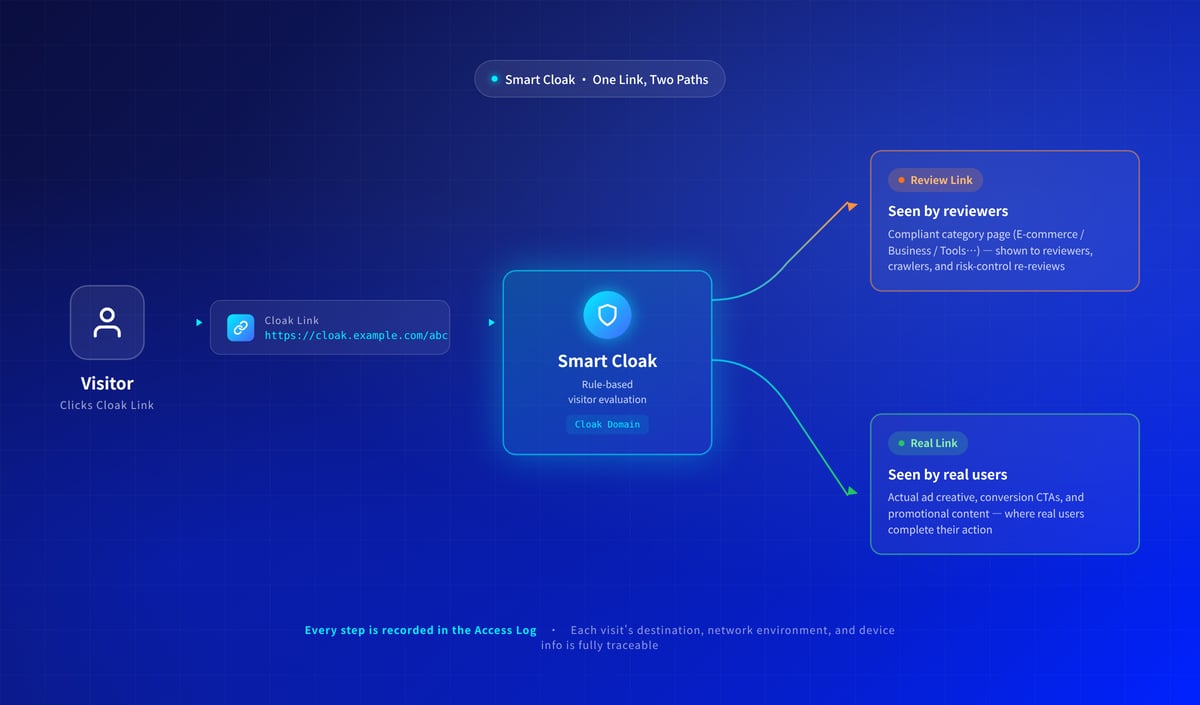
The roles of the Review Link and Real Link:
|
Link |
Audience |
Content |
|---|---|---|
|
Review Link |
Ad platform reviewers, crawlers, risk-control re-reviews |
Compliant, category-standard content (e-commerce, business sites, tools, etc.) |
|
Real Link |
Real users |
Actual ad creative, conversion CTAs, promotional content |
For the Review Link, DeepClick provides 11 built-in category presets: Default, Game Site, E-commerce, Business, Photography, Mini Game, Finance, Tools, CF BLOCK, Marketing Campaign, and Custom. Pick "E-commerce" and the system auto-fills a Shopify-like standard URL—no need to hunt for "a page that looks compliant for this category."
The Real Link is yours to set. The most common play: drop your DeepClick Reflow Link URL into the Real Link field. The path then becomes Cloak Link → Real Link (= Reflow Link) → Reflow Landing Page, chaining review-proofing and reflow conversion together.
2. Four Routing Modes
The core of Smart Cloak is the Routing Mode—it decides whether a visit goes to the Review Link or the Real Link. DeepClick Platform offers 4 modes for different campaign stages and scenarios.
All-Review: Everyone Goes to the Review Link
The strictest mode. No differentiation between users—all traffic goes to the Review Link. Common uses:
- Cold-start phase: let ad platform crawlers see a stable review page first
- Emergency takedown of the real page (route everything to the review side to avoid risk-control collateral damage)
Once you pick "All-Review," no rules need to be configured—just enter a name and submit.
Review Mode: Rule-Based Routing
The most common mode. The system evaluates each visit against multi-dimensional rules: rule matches go to the Review Link, the rest go to the Real Link. This is the workhorse for daily campaigns.
The Target Countries rule reads: "Configured regions go to the Real Link; unconfigured regions go to the Review Link." In plain words—countries you actively designate as "target campaign regions" are the only ones that see the Real Link; everyone else hits the Review Link.
All-Open: Everyone Goes to the Real Link
The loosest mode. No differentiation between users—all traffic goes to the Real Link. Common uses:
- Mature campaigns past the review window with stable risk control
- Temporary switch when testing whether the Cloak Link resolves correctly
As with All-Review, no rules need to be configured.
Green Mode: Designated Countries Go to the Review Link
Same rule support as Review Mode, but the country logic is flipped. The Target Countries rule reads: "Configured regions go to the Review Link; unconfigured regions go to the Real Link." That is, the countries you actively designate are "shielded" to the Review Link; everywhere else sees the Real Link.
Green Mode comes pre-filled with 11 high-review-risk countries (China, Hong Kong SAR, Singapore, the United States, Ireland, etc.). It's a good fit when your campaign explicitly excludes these regions but you're worried about reviewers spot-checking from there—configure them to the Review Link, and your real campaign regions stay clear.
How to Choose
A simple decision table:
|
Your Need |
Recommended Mode |
|---|---|
|
Cold-start phase, play it safe |
All-Review |
|
Clear primary regions, route by country |
Review Mode |
|
Stable operation, no routing needed |
All-Open |
|
Block specific countries outside your primary regions |
Green Mode |
3. Multi-Dimensional Filter Rules: How to Tell Who's Visiting
Once you pick "Review Mode" or "Green Mode," the rule configuration section expands to show a set of filter rules. These rules are how the cloak decides "Real Link or Review Link?"
Target Countries
Geo-based routing—the logic differences between the two modes are covered above. For most customers, the first dimension of routing is country: primary regions to the Real Link, others to the Review Link.
Environment Filter Rules
The unified hint: "Checked entries go to the Review Link; unchecked entries go to the Real Link." Two sub-dimensions:
Browser Language: Multi-select dropdown. If you primarily target English-speaking users, check Simplified Chinese, Japanese, Korean, etc. so they go to the Review Link.
Device: Three checkboxes—Desktop, Mobile, Tablet. For app-acquisition or mobile-only conversion campaigns, desktop visits are mostly reviewers or crawlers; check "Desktop" to route them to the Review Link.
IP Blacklist
Specific IPs or IP ranges, one per line. Add known reviewer office network ranges or crawler IP ranges to send these visits to the Review Link.
ISP Blacklist
Filter by ISP. Data center ISPs primarily carry crawler and scanning traffic—blacklisting them as a group prevents leaks.
Block Proxy
Toggle. When enabled, all visits identified as proxied are routed to the Review Link. Reviewers and crawlers often use proxies to bypass geo restrictions—turning this on blocks a chunk of them.
Block Empty Language
Toggle. When enabled, HTTP requests without an Accept-Language header (i.e., "empty language") are routed to the Review Link. Real browsers always send language info—empty language is rarely a real user.
4. Access Log: Every Visit Is Traceable
Once your cloak goes live, the Access Log is what you use to verify routing accuracy and troubleshoot anomalies.
Two entry points: switch to the "Access Log" tab at the top of the list page for a global view, or click "Access Log" on a specific cloak's row to view that cloak only.
Filter dimensions: Network Status / Destination / Cloak Selection / Date Range. Table columns cover Basic Info / Visit Info / Network Status / Destination / Device Info—every visit's environment is logged.
When to use it:
- Verify after configuration: After launching a new cloak, watch the log briefly to confirm reviewers and real users are routed to the correct links
- Troubleshoot complaints: A customer says, "I clicked the Real Link but saw the Review page"—pull that visit's log, check the "Destination" field, see which rule matched
- Volume analysis: The Real Link vs. Review Link ratio reflects rule strictness—an abnormally high Review Link share suggests rules are too tight; the reverse suggests too loose
5. Copy & Create: Clone Configuration in One Click
Each row's actions include a "Copy & Create" button—click it, and a new cloak is created with all configuration (links, domain, routing mode, rules) copied from the source. Just adjust the name and any specific differences, and you're ready to launch another.
Good for batch management:
- Testing different Review Link category presets against the same Real Link
- Building separate cloak links for different campaigns under the same rule set, so you can analyze data per cloak in the Access Log
- Cloning a few backup cloaks once your primary one is verified
6. Why DeepClick Smart Cloak
DeepClick Smart Cloak delivers everything Ad Cloaking Services should provide:
Smart Routing—the system evaluates each visitor automatically; no manual intervention required per visit.
Four Routing Modes—All-Review / Review Mode / All-Open / Green Mode cover cold-start, daily routing, stable operation, and regional blocking scenarios.
Omni-Media Coverage—one configuration works across Meta, Google, TikTok, and other major ad platforms; no need to write separate rules per medium.
Full Visibility—every visit's destination, network environment, and device info is traceable in the Access Log; no black box.
Multi-Dimensional Rules—seven dimensions (Target Countries, Browser Language, Device, IP, ISP, Proxy, Empty Language) combine freely to cover most reviewer identification needs.
7. Next: Configure It
Now that you know what Smart Cloak does, the next step is to configure it in DeepClick Platform.
See Smart Cloak Setup Guide: Pass Reviews Smartly, Grow Without Worry for the complete creation, link generation, and live launch flow.
