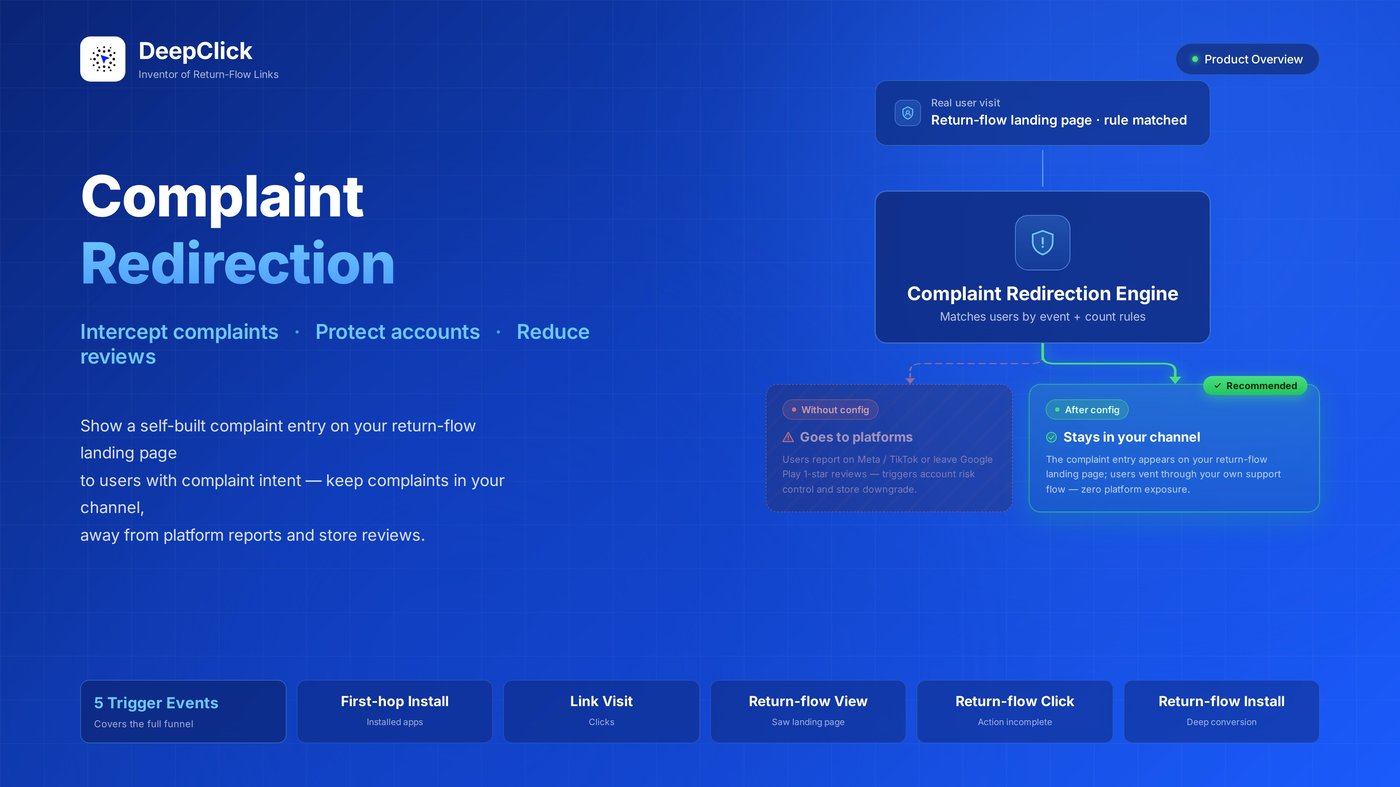
Complaint Redirection Overview: Reduce 80% of Ad & Store Complaints

Ready to configure? See the Complaint Redirection Setup Guide.
The biggest hidden killer of paid ads isn't low traffic — it's public complaints.
- One Meta complaint can blacklist your ad set
- One Google Play 1-star review can drag down install rates across your whole app
- A single "scammer" tag from a user in TikTok comments can trigger account risk control instantly
What makes it worse: most of these complaints could have been resolved inside your own customer support flow — refund requests, finding the support team, product confusion. The user just never found the entry, so they took their voice to the public.
DeepClick Complaint Redirection flips this around.
In One Sentence
For real users showing complaint intent, surface a self-built complaint entry on the return-flow landing page — keeping potential platform reports and store reviews inside your own channel.
Measured outcome: 80% of potential complaints get rerouted to the self-built channel.
The User's View: What They Actually See
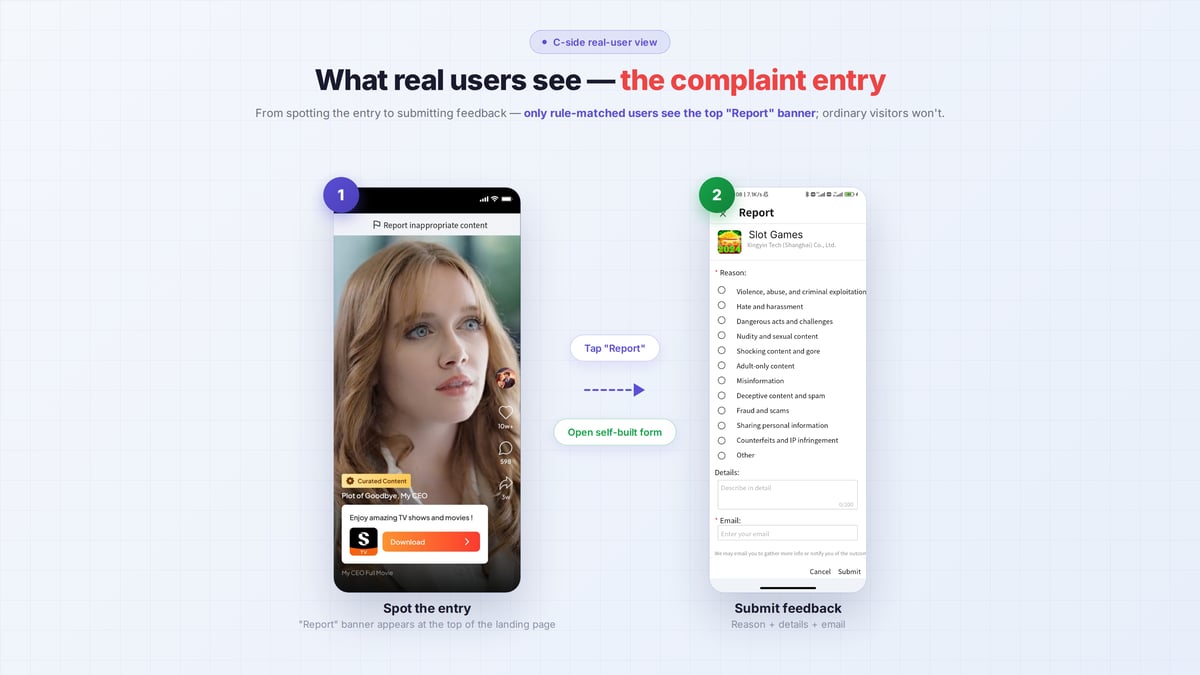
A typical user journey:
|
Stage |
User Action |
What the System Does |
|---|---|---|
|
Step 1 |
Sees a Meta ad and clicks |
Lands on the first-hop page |
|
Step 2 |
Installs your app, runs into an issue, wants support |
First-hop Install event recorded |
|
Step 3 |
Returns to your ad or the return-flow landing page |
The redirection engine sees the user already meets the rule |
|
Step 4 |
User sees the complaint entry on the return-flow landing page |
Entry placement handled by the system |
|
Step 5 |
Clicks → fills out the complaint form → submits |
Enters your own support flow, never reaching the platform or store |
The whole flow:
- The user never knows this entry is "special" — it looks like a normal feedback button
- You only need to set up the rules in advance inside the promotional link; surfacing, recording, and collection are handled by DeepClick
Why 80%
"80%" isn't marketing copy — it's actual audience coverage:
- DeepClick already tags user behavior on first ad touch — First-hop Install, Return-Flow Click, Return-Flow Install and others are attributed to specific users
- On second visit, the engine identifies users matching your rules — these are statistically the people most likely to lodge a public complaint
- The entry surfaces proactively — users don't have to hunt for "where's customer support" — visibility wins over self-discovery
Think of it as: DeepClick hands the user your customer-support business card the moment before they walk toward the complaint counter.
Five Trigger Events Covering the Full Funnel
Complaint patterns differ by funnel stage. DeepClick breaks the funnel into 5 events — pick the ones that match your business rhythm:
|
Event |
Audience It Catches |
Typical Case |
|---|---|---|
|
First-hop Install |
Users who installed your app from the first-hop page |
Most likely to leave store reviews |
|
Link Visit |
Users with N+ visits to the promotional link |
Repeated ad clickers who never converted — likely have a question |
|
Return-Flow Impression |
Users who saw the return-flow landing page N+ times |
Have seen your secondary content |
|
Return-Flow Click |
N+ clicks on the return-flow landing page |
Trying to do something but not succeeding |
|
Return-Flow Install |
Installed your app via the return-flow landing page |
Deeply converted users — concerns are specific |
Each link supports up to 2 rules, joined by OR / AND as you choose — match either or require both, your call.
Complaint Redirection vs Other Approaches
|
Approach |
Interception |
Limitation |
|---|---|---|
|
In-app support |
High |
User must open the app — non-installers excluded |
|
Fixed contact info on landing page |
Medium |
Visible to everyone, may invite complaints from users who had no issue |
|
DeepClick Complaint Redirection |
High |
Only shows to rule-matched users — precise and quiet for other traffic |
The biggest delta is audience precision — only users statistically likely to complain see the entry.
Best Fit For
- Performance teams whose ad accounts get suspended often — each public complaint shortens account lifetime
- App-store-sensitive app businesses — one 1-star review takes dozens of 5-stars to offset
- Cost-conscious e-commerce with slow-to-respond support — rerouting complaints to internal support beats letting the platform see them first
- Anyone already running return-flow ad campaigns — your return-flow landing page is already there; this layer adds almost no overhead
Ready to Start
The Complaint Redirection module itself is a data dashboard for reviewing submitted complaints.
Actual rule configuration lives inside each Promotional Link — open the "Complaint Redirection Settings" tab, enable the toggle, configure event + count rules. Users matching those rules will see the complaint entry on your return-flow landing page automatically.
Four steps, five minutes:
→ Read the Complaint Redirection Setup Guide
Related Reading
- Pair your link with a review-defense strategy → Smart Cloak Setup Guide
- Understand the full return-flow link feature → Fallback Page Overview
- Need an account or have questions → contact the DeepClick business team
